-----
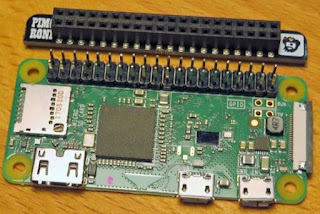
We did a @cheerlights project that used a Raspberry PI Zero and a Blinkt! LED bar to keep track of the last eight color changes the cheerlights server received. We put the rig in the garage and enjoyed the Blinkt! LED bar change color as The Internet masses dictated what rainbow of colors would be displayed. But, that wasn't enough. To control CheerLights, send a tweet to @cheerlights or include “cheerlights” somewhere in your message with the name of a color. for example, @CheerLights Paint the town red. [UPDATE: After The RocketMan took over Twitter the API no longer functions. To learn more about how to control any cheerlights project, including this one, go to https://cheerlights.com/]
-----
The Amazon impulse buy AI suggested that our life could be complete only if we spent $7.99US on the DollaTEK DY-SV17F mini MP3 module and an idea was born. What if, we added sound to the existing @cheerlights project and a short MP3 sound clip was played in addition to the LED color change? If The Internet masses demand 'purple' we change an LED to 'purple' and play a clip from the song "Purple Rain". 'pink' would trigger "Pink Cadillac". 'red' triggers "Red Red Wine". You get the idea....
-----
The DollaTEK DY-SV17F module has a UART mode to reduce the pins needed to control it, but the module is big on features and short on documentation for use with the Raspberry PI. After not being able to get UART mode to work (probably user error) it was decided to use the plentiful GPIO pins on the Raspberry PI Zero and go with a parallel interface solution. Here is a short video of the result:
-----
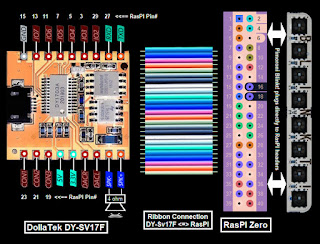
Connection was straightforward:

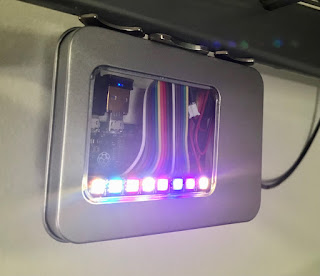
Packaged and mounted in the garage:
For the rig to work the two python programs below run on the RasPI at the same time; cheerlights.py and cheerlights_sound.py.
-----
The cheerlights.py source code below updates the LEDs on the Blinkt! LED bar:
#!/usr/bin/env python
# Cheerlights with Pimoroni BlinkT module and RasPI Zero
#
# A tweet to @Cheerlights will change the LEFT most color of the BlinkT (LED#7)
# Color history maintained by shifting old color to the RIGHT (LED#0)
# Valid color tweets to @Cheerlights are:
# RED GREEN BLUE CYAN WHITE OLDLACE PURPLE MAGENTA YELLOW ORANGE PINK
#
# Project details at:
# WhiskeyTangoHotel.Com
#
# MARCH 2022
# JULY 2022 add DollaTek DY-SV17F to play sound clip pwr color as independent and seperate program
#
import time
import sys
try:
import requests # needed to poll @Cheerlights
except ImportError:
exit("Install needed to run. Use the command: sudo pip install requests")
from blinkt import set_clear_on_exit, set_pixel, show, set_brightness, clear # https://shop.pimoroni.com/products/blinkt#
LED_delay = 0.5
brightness = 0.1 # 0.05 is lowest useable dim. 1.0 is full bright (the BLINKT is *really* bright if you want!)
#Set up a matrix for r, g, b values (m stands for matrix)
rm = [0,1,2,3,4,5,6,7,8]
gm = [0,1,2,3,4,5,6,7,8]
bm = [0,1,2,3,4,5,6,7,8]
# set_pixel(pixel_no, red, green, blue, brightness)
print "Testing LEDs..."
print "---------------------------------------------"
for i in range(3):
for j in range (0,8):
set_pixel(j, 30, 0, 0, brightness)
print "RED"
show()
time.sleep(LED_delay)
for j in range (0,8):
set_pixel(j, 0, 30, 0, brightness)
print "GREEN"
show()
time.sleep(LED_delay)
for j in range (0,8):
set_pixel(j, 0, 0, 30, brightness)
print "BLUE"
show()
time.sleep(LED_delay)
# all LEDs off
for j in range (0,8):
set_pixel(j, 0, 0,0)
show()
print "LED Self test complete!"
for j in range (0,8): # set values that we know are 'wrong' to enter main loop
rm[j] = 73.73
gm[j] = 73.73
bm[j] = 73.73
print " "
while True:
try:
r = requests.get('http://api.thingspeak.com/channels/1417/field/2/last.json')
col = r.json()['field2']
r, g, b = tuple(ord(c) for c in col[1:].lower().decode('hex'))
time.sleep(5) # delay until we look for a new color change
if (r != rm[7]) or (g != gm[7]) or (b != bm[7]): # new color selected
print "New color placed far LEFT. Shift old colors RIGHT one place"
for j in range (0,7): #shift in the new values
rm[j] = rm[j+1]
gm[j] = gm[j+1]
bm[j] = bm[j+1]
set_pixel(j, rm[j], gm[j], bm[j], brightness)
show()
time.sleep(LED_delay) # show change as a sweep
rm[7] = r
gm[7] = g
bm[7] = b
set_pixel(7, rm[7], gm[7], bm[7], brightness)
show()
# All LED off on control C
except KeyboardInterrupt:
print("stopping ...")
sys.exit(0)
except:
time.sleep(1)
-----
The cheerlights_sound.py source code below runs the DollaTEK DY-SV17F:
# Cheerlights with DY-SV17F module for sound and RasPI Zero
#
# A tweet to @Cheerlights will play sound file
# Valid color tweets to @Cheerlights are:
# RED GREEN BLUE CYAN WHITE OLDLACE PURPLE MAGENTA YELLOW ORANGE PINK
#
# Project details at:
# WhiskeyTangoHotel.Com
#
# MARCH 2022
# JULY 2022 add DollaTek DY-SV17F to play sound clip pwr color as independent and seperate program
#
# DallaTEK DY-SV17F Files mapped to Cheerlights color. MP3s vary from ~10-30 secs
# 00001.mp3 = red (red red wine)
# 00002.mp3 = green (green green gras of home)
# 00003.mp3 = blue (blue bayoe)
# 00004.mp3 = cyan (call me cyan)
# 00005.mp3 = white (whiter shade of pale)
# 00006.mp3 = oldlace (leather and lace)
# 00007.mp3 = purple (purple rain [of course])
# 00008.mp3 - magenta (some song calll 'magenta')
# 00009.mp3 = yellow (yellow submarine)
# 00010.mp3 = orange (orange crush)
# 00011.mp3 = pink (pink cadi)
# 00012.mp3 = start speaker test file (start me up)
import time
import requests # needed to poll @Cheerlights
import RPi.GPIO as GPIO
GPIO.setmode(GPIO.BOARD) # to use Raspberry PI board pin numbers
#Define some pins and vars
IO_0 = 31
IO_1 = 29
IO_2 = 3
IO_3 = 5
IO_4 = 7
IO_5 = 11
IO_6 = 13
IO_7 = 15
CON_1 = 19
CON_2 = 21
CON_3 = 23
current_color_mp3 = "clear" # set color value that we know is 'wrong' to enter main loop
delta_time = 0 # track seconds since last color change
#Setup the GPIO and make sure the speaker is OFF
GPIO.setwarnings(False) # To disable warnings.
GPIO.setup(IO_0, GPIO.OUT)
GPIO.setup(IO_1, GPIO.OUT)
GPIO.setup(IO_2, GPIO.OUT)
GPIO.setup(IO_3, GPIO.OUT)
GPIO.setup(IO_4, GPIO.OUT)
GPIO.setup(IO_5, GPIO.OUT)
GPIO.setup(IO_6, GPIO.OUT)
GPIO.setup(IO_7, GPIO.OUT)
GPIO.setup(CON_1, GPIO.OUT)
GPIO.setup(CON_2, GPIO.OUT)
GPIO.setup(CON_3, GPIO.OUT) #HIGH = speaker sound. LOW = sound off
GPIO.output(CON_1, GPIO.LOW)
GPIO.output(CON_2, GPIO.LOW)
GPIO.output(CON_3, GPIO.LOW) #HIGH = speaker sound. LOW = sound off
# Test the speaker at startup
print "Testing speaker..."
GPIO.output(CON_3, GPIO.HIGH) # turn ON the speaker
GPIO.output(IO_0, GPIO.HIGH)
GPIO.output(IO_1, GPIO.HIGH)
GPIO.output(IO_2, GPIO.LOW)
GPIO.output(IO_3, GPIO.LOW)
GPIO.output(IO_4, GPIO.HIGH)
GPIO.output(IO_5, GPIO.HIGH)
GPIO.output(IO_6, GPIO.HIGH)
GPIO.output(IO_7, GPIO.HIGH)
time.sleep(5) # secs in this mp3
GPIO.output(CON_3, GPIO.LOW) # turn OFF the speaker
print "Speaker test complete!"
print
while True: # main loop
# ID the Color and Play the MP3 file asscd with that color
r = requests.get('http://api.thingspeak.com/channels/1417/field/1/last.json')
color_mp3 = r.json()['field1']
#color_mp3 = "pink" # override color_mp3 var for debug.
print str(delta_time * 5) + " seconds spent waiting for color change..."
time.sleep(5) # delay until we look for a new color change
delta_time = delta_time + 1
if (color_mp3 != current_color_mp3): # new color selected
current_color_mp3 = color_mp3
delta_time = 0
print color_mp3 + " found and..."
if (color_mp3 == "red"): # is 00001.mp3
GPIO.output(CON_3, GPIO.HIGH) # turn ON the speaker
GPIO.output(IO_0, GPIO.LOW)
GPIO.output(IO_1, GPIO.HIGH)
GPIO.output(IO_2, GPIO.HIGH)
GPIO.output(IO_3, GPIO.HIGH)
GPIO.output(IO_4, GPIO.HIGH)
GPIO.output(IO_5, GPIO.HIGH)
GPIO.output(IO_6, GPIO.HIGH)
GPIO.output(IO_7, GPIO.HIGH)
time.sleep(19) # secs in this mp3
GPIO.output(CON_3, GPIO.LOW) # turn OFF the speaker
if (color_mp3 == "green"): # is 00002.mp3
GPIO.output(CON_3, GPIO.HIGH) # turn ON the speaker
GPIO.output(IO_0, GPIO.HIGH)
GPIO.output(IO_1, GPIO.LOW)
GPIO.output(IO_2, GPIO.HIGH)
GPIO.output(IO_3, GPIO.HIGH)
GPIO.output(IO_4, GPIO.HIGH)
GPIO.output(IO_5, GPIO.HIGH)
GPIO.output(IO_6, GPIO.HIGH)
GPIO.output(IO_7, GPIO.HIGH)
time.sleep(33) # secs in this mp3
GPIO.output(CON_3, GPIO.LOW) # turn OFF the speaker
if (color_mp3 == "blue"): # is 00003.mp3
GPIO.output(CON_3, GPIO.HIGH) # turn ON the speaker
GPIO.output(IO_0, GPIO.LOW)
GPIO.output(IO_1, GPIO.LOW)
GPIO.output(IO_2, GPIO.HIGH)
GPIO.output(IO_3, GPIO.HIGH)
GPIO.output(IO_4, GPIO.HIGH)
GPIO.output(IO_5, GPIO.HIGH)
GPIO.output(IO_6, GPIO.HIGH)
GPIO.output(IO_7, GPIO.HIGH)
time.sleep(20) # secs in this mp3
GPIO.output(CON_3, GPIO.LOW) # turn OFF the speaker
if (color_mp3 == "cyan"): # is 00004.mp3
GPIO.output(CON_3, GPIO.HIGH) # turn ON the speaker
GPIO.output(IO_0, GPIO.HIGH)
GPIO.output(IO_1, GPIO.HIGH)
GPIO.output(IO_2, GPIO.LOW)
GPIO.output(IO_3, GPIO.HIGH)
GPIO.output(IO_4, GPIO.HIGH)
GPIO.output(IO_5, GPIO.HIGH)
GPIO.output(IO_6, GPIO.HIGH)
GPIO.output(IO_7, GPIO.HIGH)
time.sleep(16) # secs in this mp3
GPIO.output(CON_3, GPIO.LOW) # turn OFF the speaker
if (color_mp3 == "white"): # is 00005.mp3
GPIO.output(CON_3, GPIO.HIGH) # turn ON the speaker
GPIO.output(IO_0, GPIO.LOW)
GPIO.output(IO_1, GPIO.HIGH)
GPIO.output(IO_2, GPIO.LOW)
GPIO.output(IO_3, GPIO.HIGH)
GPIO.output(IO_4, GPIO.HIGH)
GPIO.output(IO_5, GPIO.HIGH)
GPIO.output(IO_6, GPIO.HIGH)
GPIO.output(IO_7, GPIO.HIGH)
time.sleep(19) # secs in this mp3
GPIO.output(CON_3, GPIO.LOW) # turn OFF the speaker
if (color_mp3 == "oldlace"): # is 00006.mp3
GPIO.output(CON_3, GPIO.HIGH) # turn ON the speaker
GPIO.output(IO_0, GPIO.HIGH)
GPIO.output(IO_1, GPIO.LOW)
GPIO.output(IO_2, GPIO.LOW)
GPIO.output(IO_3, GPIO.HIGH)
GPIO.output(IO_4, GPIO.HIGH)
GPIO.output(IO_5, GPIO.HIGH)
GPIO.output(IO_6, GPIO.HIGH)
GPIO.output(IO_7, GPIO.HIGH)
time.sleep(27) # secs in this mp3
GPIO.output(CON_3, GPIO.LOW) # turn OFF the speaker
if (color_mp3 == "purple"): # is 00007.mp3
GPIO.output(CON_3, GPIO.HIGH) # turn ON the speaker
GPIO.output(IO_0, GPIO.LOW)
GPIO.output(IO_1, GPIO.LOW)
GPIO.output(IO_2, GPIO.LOW)
GPIO.output(IO_3, GPIO.HIGH)
GPIO.output(IO_4, GPIO.HIGH)
GPIO.output(IO_5, GPIO.HIGH)
GPIO.output(IO_6, GPIO.HIGH)
GPIO.output(IO_7, GPIO.HIGH)
time.sleep(25) # secs in this mp3
GPIO.output(CON_3, GPIO.LOW) # turn OFF the speaker
if (color_mp3 == "magenta"): # is 00008.mp3
GPIO.output(CON_3, GPIO.HIGH) # turn ON the speaker
GPIO.output(IO_0, GPIO.HIGH)
GPIO.output(IO_1, GPIO.HIGH)
GPIO.output(IO_2, GPIO.HIGH)
GPIO.output(IO_3, GPIO.LOW)
GPIO.output(IO_4, GPIO.HIGH)
GPIO.output(IO_5, GPIO.HIGH)
GPIO.output(IO_6, GPIO.HIGH)
GPIO.output(IO_7, GPIO.HIGH)
time.sleep(26) # secs in this mp3
GPIO.output(CON_3, GPIO.LOW) # turn OFF the speaker
if (color_mp3 == "yellow"): # is 00009.mp3
GPIO.output(CON_3, GPIO.HIGH) # turn ON the speaker
GPIO.output(IO_0, GPIO.LOW)
GPIO.output(IO_1, GPIO.HIGH)
GPIO.output(IO_2, GPIO.HIGH)
GPIO.output(IO_3, GPIO.LOW)
GPIO.output(IO_4, GPIO.HIGH)
GPIO.output(IO_5, GPIO.HIGH)
GPIO.output(IO_6, GPIO.HIGH)
GPIO.output(IO_7, GPIO.HIGH)
time.sleep(18) # secs in this mp3
GPIO.output(CON_3, GPIO.LOW) # turn OFF the speaker
if (color_mp3 == "orange"): # is 00010.mp3
GPIO.output(CON_3, GPIO.HIGH) # turn ON the speaker
GPIO.output(IO_0, GPIO.HIGH)
GPIO.output(IO_1, GPIO.LOW)
GPIO.output(IO_2, GPIO.HIGH)
GPIO.output(IO_3, GPIO.LOW)
GPIO.output(IO_4, GPIO.HIGH)
GPIO.output(IO_5, GPIO.HIGH)
GPIO.output(IO_6, GPIO.HIGH)
GPIO.output(IO_7, GPIO.HIGH)
time.sleep(22) # secs in this mp3
GPIO.output(CON_3, GPIO.LOW) # turn OFF the speaker
if (color_mp3 == "pink"): # is 00010.mp3
GPIO.output(CON_3, GPIO.HIGH) # turn ON the speaker
GPIO.output(IO_0, GPIO.LOW)
GPIO.output(IO_1, GPIO.LOW)
GPIO.output(IO_2, GPIO.HIGH)
GPIO.output(IO_3, GPIO.LOW)
GPIO.output(IO_4, GPIO.HIGH)
GPIO.output(IO_5, GPIO.HIGH)
GPIO.output(IO_6, GPIO.HIGH)
GPIO.output(IO_7, GPIO.HIGH)
time.sleep(25) # secs in this mp3
GPIO.output(CON_3, GPIO.LOW) # turn OFF the speaker
print color_mp3 + " playing completed!"
print
-----