Showing posts with label RGB LED. Show all posts

Wednesday, June 25, 2025

TCS34725 Color Sensing Cube with Arduino

-----

Whatever color the TCS34725 sensor "sees" is reproduced on the orb on top of the cube.   The switch in front is hardwired to the LED light on the front of the sensor because we found the LED annoying and most of the time unnecessary.

-----

Bill of Materials....

     TCS34725

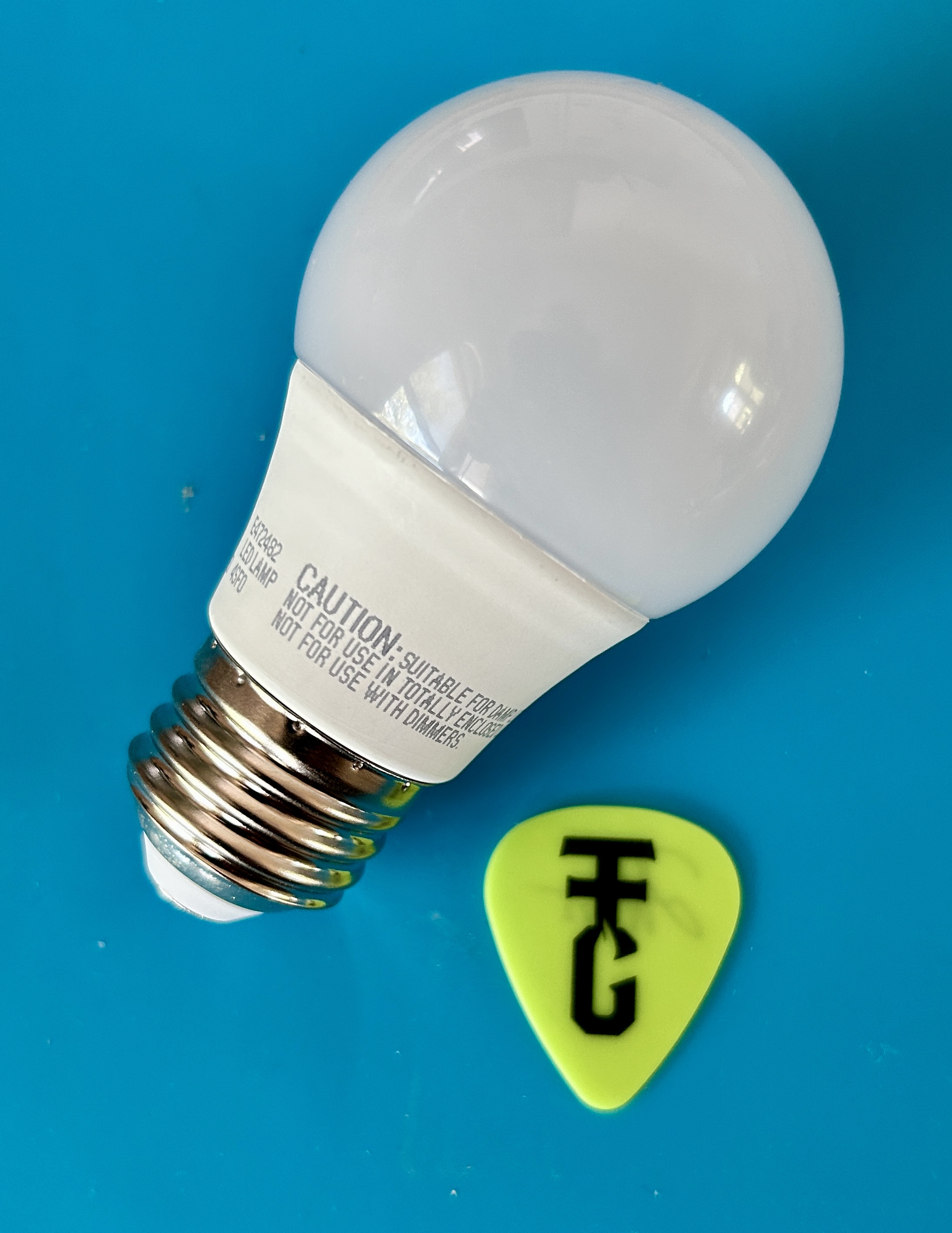
     The orb is a plastic cover from a non functioning LED light bulb: 

     An old Arduino Nano: 
    A switch and a 3D Printed Box:  
-----

Wire per the comments in the Arduino sketch below and you should get this:


-----

// Read Color Sensor.  Mimic color on RGB LED sees
// https://www.whiskeytangohotel.com/
// JUNE 2026

// Arduino Nano but, must selected under Tools → Processor:
// ATmega328P (Old Bootloader) or suffer the avrdude error.

#include <Wire.h>
#include "Adafruit_TCS34725.h"

// TCS34725 SDA pin should be connected to A4
// TCS34725 SCL pin should be connected to A5
// TCS34725 GND to GND
// TCS34725 3.3V to 5V (Vin is No Connect)
// TCS34725 LED goes to hardwired switch  

// Define pins for RGB LED
const int RED_PIN = 10;
const int GREEN_PIN = 9;
const int BLUE_PIN = 11;

// Define digital pin for TCS34725 LED control
const int SENSOR_LED_PIN = 6;  // Not used, this LED is controlled with a hardwired switch

// Initialize the sensor
Adafruit_TCS34725 tcs = Adafruit_TCS34725(
  TCS34725_INTEGRATIONTIME_50MS,
  TCS34725_GAIN_4X
);

void setup() {
  Serial.begin(9600);  // We use the serial monitor for debug
  
  // RGB LED pins
  pinMode(RED_PIN, OUTPUT);
  pinMode(GREEN_PIN, OUTPUT);
  pinMode(BLUE_PIN, OUTPUT);

  // Sensor LED control pin
  pinMode(SENSOR_LED_PIN, OUTPUT);
  digitalWrite(SENSOR_LED_PIN, LOW); // turn off sensor LED initially

  if (tcs.begin()) {
    Serial.println("TCS34725 sensor found");
    // Self-test only if sensor found: cycle RGB LED through R, G, B 
    for (int i = 7; i > 0; i--) {
      // Red
      Serial.println("RED Self Test");
      analogWrite(RED_PIN, 255);
      analogWrite(GREEN_PIN, 0);
      analogWrite(BLUE_PIN, 0);
      delay(50 * i);

      // Green
      Serial.println("GREEN Self Test");
      analogWrite(RED_PIN, 0);
      analogWrite(GREEN_PIN, 255);
      analogWrite(BLUE_PIN, 0);
      delay(50 * i);

      // Blue
      Serial.println("BLUE Self Test");
      analogWrite(RED_PIN, 0);
      analogWrite(GREEN_PIN, 0);
      analogWrite(BLUE_PIN, 255);
      delay(50 * i);  
    }  
  } else {
    Serial.println("No TCS34725 sensor found ... check wiring?");
    // RED LED to show error
    analogWrite(RED_PIN, 155);
    analogWrite(GREEN_PIN, 0);
    analogWrite(BLUE_PIN, 0);
    while (1);
  }
}

void loop() {
  uint16_t r, g, b, c;
  tcs.getRawData(&r, &g, &b, &c);

  if (c < 5) {
    // In near total darkness: cycle through rainbow
    showRainbowCycle();
  } else {
    // Normal color mimic
    uint16_t maxRaw = max(max(r, g), b);
    if (maxRaw == 0) maxRaw = 1;

    int redVal   = (uint32_t)r * 255 / maxRaw;
    int greenVal = (uint32_t)g * 255 / maxRaw;
    int blueVal  = (uint32_t)b * 255 / maxRaw;

    redVal   = constrain(redVal, 0, 255);
    greenVal = constrain(greenVal, 0, 255);
    blueVal  = constrain(blueVal, 0, 255);

    analogWrite(RED_PIN,   gammaCorrect(redVal));
    analogWrite(GREEN_PIN, gammaCorrect(greenVal));
    analogWrite(BLUE_PIN,  gammaCorrect(blueVal));
  }

  delay(50); // smooth update
}


int gammaCorrect(int val) {  // makes it look "better"
  float gamma = 2.2;
  return pow(val / 255.0, gamma) * 255.0;
}

void showRainbowCycle() {  // If full dark gentle cycle thru colors
  static float hue = 0;
  hue += 0.5;  // Change speed here
  if (hue > 360) hue = 0;

  float r, g, b;
  float s = 1.0;
  float v = 1.0;
  float h = hue;

  int i = int(h / 60.0) % 6;
  float f = h / 60.0 - i;
  float p = v * (1 - s);
  float q = v * (1 - f * s);
  float t = v * (1 - (1 - f) * s);

  switch(i) {
    case 0: r = v, g = t, b = p; break;
    case 1: r = q, g = v, b = p; break;
    case 2: r = p, g = v, b = t; break;
    case 3: r = p, g = q, b = v; break;
    case 4: r = t, g = p, b = v; break;
    case 5: r = v, g = p, b = q; break;
  }

  analogWrite(RED_PIN,   gammaCorrect(int(r * 255)));
  analogWrite(GREEN_PIN, gammaCorrect(int(g * 255)));
  analogWrite(BLUE_PIN,  gammaCorrect(int(b * 255)));
}
-----

Tuesday, January 23, 2024

WS2812B LED Fireworks Simulator


-----

WS2812B LED strips are pretty cool.  They are string of individually addressable RGB LEDs.  This allows control of the color and brightness of each LED.

Fireworks are also pretty cool.  On the downside they can be dangerous, scare wildlife, start fires, be expensive, illegal, etc.   So, until we can afford our own fleet of drones we settled on this alternative.  Like many projects, we stand on the shoulders of giants mentioned in the Ardunio source code below.  Our main issue with their code was the effect was never changing so we improved mainly on that aspect; a few other things as well.

----

Result:

-----

The hardware is an ESP8266 and a WS2812B LED-strip with 300 LEDs (16.5 feet).  We wanted to use a Ardunio Nano (because we had one), but due to the amount of memory needed to define the arrays for the 300 LEDs we went with an ESP8266 (because we had one).

-----
You are also going to need a big pole.


-----

/*  
 *  LED Fireworks Simulator
 *  WhiskeyTangoHotel.Com
 *  JAN 2024
 *
 *  To vary the effect experiments randomizing variables
 *  within acceptable limits was done.  Otherwise the effect
 *  just looks to same 'shot after shot'.  Other mods as well
  *
 *  Leverage from https://www.Daniel-Westhof.de and
 *  https://www.anirama.com/1000leds/1d-fireworks/
 *
 *  Hardware:  
 *  HiLetgo 1PC ESP8266 NodeMCU CP2102 ESP-12E Development Board and a
 *  WS2812B LED-strip with 300 LEDs (16.5 feet).
 */
 
#include <FastLED.h>
#define NUM_LEDS 300
#define DATA_PIN 5  // Labeled a D1 on the board.
#define LED_PIN 2  // This is the BLUE LED on board
#define NUM_SPARKS NUM_LEDS/2  // OG: NUM_LEDS/2
 
CRGB leds[NUM_LEDS]; // sets up block of memory
 
float sparkPos[NUM_SPARKS];
float sparkVel[NUM_SPARKS];
float sparkCol[NUM_SPARKS];
float flarePos;
float gravity = -.008; // m/s/s
int launch_delay; // we later randomize seconds between launches
 
void setup() {
  Serial.begin(115200);
  FastLED.addLeds<NEOPIXEL, DATA_PIN>(leds, NUM_LEDS);
  pinMode(LED_PIN, OUTPUT);
}
 
void loop() {   
  // Delay untill next launch. Blink BLUE on board LED
  Serial.println("  ");
  launch_delay = int(random(5,30)); // Min>=5.  Randomize secs between BOOMs.  
  //launch_delay = 5;   
  for (int i = (launch_delay - 5); i > 0; i--) {
    Serial.println(String(i + 5) + " seconds to launch...");
    digitalWrite(LED_PIN, LOW);  // ON
    delay(500);
    digitalWrite(LED_PIN, HIGH);  // OFF
    delay(500);    
  }

  // Slower timer done .  Fast blink for ~5 seconds to warn of BOOM
  Serial.print("5 seconds to launch!!!");
  for (int i = 50; i > 0; i--) {
    Serial.print(".");
    digitalWrite(LED_PIN, LOW);  // ON
    delay(50);
    digitalWrite(LED_PIN, HIGH);  // OFF
    delay(50);
  }

  Serial.println(".");
  Serial.print("BOOM...");
  digitalWrite(LED_PIN, LOW); // LED ON
 
  // send up flare
  flare();
  digitalWrite(LED_PIN, HIGH); // LED OFF
 
  // explode
  explodeLoop();
}
 

void flare() {
  flarePos = 0;  // 0
  // flareVel is how hight the BOOM is.  2.2 is max height
  float flareVel = float(random(180, 215)) / 100; // Start: (180, 195)) / 100; trial and error to get reasonable range
  Serial.println(" with flare height of " + String((flareVel*100)/2.2) + "%");  // How high is the BOOM?
  float brightness = 5;   // OG: 1
 
  // initialize launch sparks
  int blast_base = random(5,20);  // number of sparks at blast base.
  for (int i = 0; i < blast_base; i++) {   // OG: int i = 0; i < 5; i++  
    sparkPos[i] = 0; sparkVel[i] = (float(random8()) / 255) * (flareVel / 2); // OG: (float(random8()) / 255) * (flareVel / 5); the / xx); is control value for BURST
    sparkCol[i] = sparkVel[i] * 1000; sparkCol[i] = constrain(sparkCol[i], 0, 255);
    //Serial.println(String(i) + "   " + String(sparkVel[i]) + "  " + String(sparkCol[i]));
  }  

  // launch
  while (flareVel >= -.2) {   // OG: flareVel >= -.2  when to explode after peak BOOM.  Bigger neg val means more fall before sparks
    // sparks
    for (int i = 0; i < blast_base; i++) {   // OG: int i = 0; i < 5; i++  
      sparkPos[i] += sparkVel[i];
      sparkPos[i] = constrain(sparkPos[i], 0, 120);
      sparkVel[i] += gravity;
      sparkCol[i] += -.8;
      sparkCol[i] = constrain(sparkCol[i], 0, 255);
      leds[int(sparkPos[i])] = HeatColor(sparkCol[i]);
      leds[int(sparkPos[i])] %= 50; // reduce brightness to 50/255
    }
   
    // flare
    leds[int(flarePos)] = CHSV(0, 0, int(brightness * 255));
    FastLED.show();
    delay(5);
    FastLED.clear();
    flarePos += flareVel;
    flarePos = constrain(flarePos, 0, NUM_LEDS-1);
    flareVel += gravity;
    brightness *= .99; // OG = .98
  }  // while (flareVel >= -.2)
}  // end void flare
 
void explodeLoop() {
  int nSpark_var = random(2, 10);  // Bigger number is less BOOM sparks
  int nSparks = flarePos / nSpark_var; // OG: nSparks = flarePos / 2
  //Serial.println(String(nSparks));

   
  // initialize sparks
  for (int i = 0; i < nSparks; i++) {
    sparkPos[i] = flarePos; sparkVel[i] = (float(random(0, 20000)) / 10000.0) - 1.0; // from -1 to 1
    sparkCol[i] = abs(sparkVel[i]) * 500; // set colors before scaling velocity to keep them bright
    sparkCol[i] = constrain(sparkCol[i], 0, 255);
    sparkVel[i] *= flarePos / NUM_LEDS; // proportional to height
  }
  sparkCol[0] = 255; // OG: 255  This will be our known spark
  float dying_gravity = gravity;
  float c1 = random(80,130);  // OG: 120
  float c2 = random(1,30);   // OG: 50
  //Serial.println("c1 is: " + String(c1));
  //Serial.println("c2 is: " + String(c2));
    
 
  while(sparkCol[0] > c2/128) { // OG: (sparkCol[0] > c2/128)  As long as our known spark is lit, work with all the sparks
    int decay_rate = (random(0,50));  // Slow to decay the blast sparks.  (0,50) seems right. Bigger is slower.  OG: delay(0);
    delay(decay_rate);
    //Serial.println(String(decay_rate));
    FastLED.clear();
    
    for (int i = 0; i < nSparks; i++) {   
      sparkPos[i] += sparkVel[i];
      sparkPos[i] = constrain(sparkPos[i], 0, NUM_LEDS-1);
      sparkVel[i] += dying_gravity;
      sparkCol[i] *= .975;
      sparkCol[i] = constrain(sparkCol[i], 0, 255); // RED cross dissolve. OG: constrain(sparkCol[i], 0, 255);
      
      if(sparkCol[i] > c1) { // fade white to yellow
        leds[int(sparkPos[i])] = CRGB(random(0,255), random(200,255), (255 * (sparkCol[i] - c1)) / (255 - c1));  // OG: CRGB(255, 255, (255 * (sparkCol[i] - c1)) / (255 - c1));
      }
      else if (sparkCol[i] < c2) { // fade from red to black
        leds[int(sparkPos[i])] = CRGB((random(200,255) * sparkCol[i]) / c2, 0, 0); // OG: CRGB((255 * sparkCol[i]) / c2, 0, 0);
      }
      else { // fade from yellow to red
        leds[int(sparkPos[i])] = CRGB(random(0,255), (random(200,255) * (sparkCol[i] - c2)) / (c1 - c2), 0);  // OG: CRGB(255, (255 * (sparkCol[i] - c2)) / (c1 - c2), 0);
      }      
    }
    dying_gravity *= .99; // OG: dying_gravity *= .99;  As sparks burn out they fall slower
    FastLED.show();    
  }  // end while(sparkCol)
 
  delay(5);
  FastLED.clear();
  delay(5);  
  FastLED.show();
  Serial.println("Effect Complete!!!");
} // end void explodeLoop() 

-----

Sunday, April 10, 2016

Graphing Current Drain of the Sparkfun BadgerHack

-----
Sparkfun had a nice booth at SXSW in Austin that let you build and walk away with their BadgerHack project.  Very generous and Thanks!  Also at the booth were some of the 'moviestars' often seen on their YouTube channel.  It was great to meet a few of them.

I was curious about the current drain of all those LEDs dancing on the display.  I had access to a Keithley 2461 SourceMeter/SMU which makes it easy to run the experiment.  The video below tells it all. 

-----
Thanks again, Sparkfun!